
SimplyWise: Receipts, Expenses
SimplyWiseFinance
4.71.07K Reviews
- Version
- 0.83.0
- Installs
- 100.00K
- Age Rating
- Everyone
Screenshots


Our Review of SimplyWise: Receipts, Expenses
 Analysis by Appyee
I find receipt capture the most useful way to judge SimplyWise: Receipts, Expenses. A paper receipt is easy to lose and awkward to sort later; turning it into a digital record while it is still in your hand can make the difference between knowing what a purchase was and guessing at tax time. That focus makes this finance app especially relevant to freelancers and other self-employed people, though anyone who wants a tidier expense trail may find it helpful.
Why capturing receipts can change the routine
The real benefit of a scanner is not simply having a picture of a receipt. It is reducing the gap between spending money and recording the expense. When I put off bookkeeping until the end of the week or month, small purchases become a memory test: which shop was that, and what was it for? Capturing receipts as I go gives me a better starting point for sorting those details later.
That approach is particularly useful for work expenses that look much like ordinary personal spending. A meal, a supply purchase, or a journey-related cost can be hard to identify in a bank statement alone. A receipt adds context. I would still review the captured information before relying on it, but having the original image beside the entry makes checking less tedious than searching through a wallet or email inbox.
A practical rhythm for using it
I would treat receipt scanning as a small habit rather than a monthly cleanup project. After a purchase, take the photo while the receipt is flat and legible, then check the result when you have a moment. This is a more dependable workflow than letting paper build up in a bag and hoping every slip is still readable weeks later.
For a busy day with several work-related purchases, I would make a quick pass in the evening: check that each receipt is present, correct anything the scanner has misunderstood, and separate business spending from personal spending. That final distinction matters. Automatic recognition can save typing, but it cannot make a judgment about whether a purchase qualifies as a business expense in your circumstances.
Where it fits among finance tools
Compared with a notes app or a folder of receipt photos, SimplyWise is designed to bring receipt capture and expense tracking into the same bookkeeping routine. A spreadsheet can offer more control over categories and formulas, but it also asks you to enter and maintain the records yourself. A bank app may show card transactions, yet a transaction line does not always preserve the item-level context a receipt provides.
I see the app as a practical middle ground for someone who wants more structure than a camera roll but does not want every expense to become a manual spreadsheet task. It is not a substitute for checking your records or applying tax rules carefully. If you already have an established accounting system that handles receipt capture well, switching may add another place to maintain information rather than simplify anything.
Who will get the most from the scanner
The strongest fit is someone with regular work purchases, a manageable volume of receipts, and a real need to keep supporting records together. A freelancer who buys supplies throughout the week, for example, can photograph each slip on the way out of a shop and review the entries during a weekly admin session. That is easier to sustain than trying to reconstruct a month of spending from memory.
It is less compelling for someone who rarely handles paper receipts or already records expenses immediately in another tool. It may also frustrate people who expect scanning to make every decision for them. Recognition can identify text, but deciding what a purchase was for, whether it was personal or professional, and how it should be treated still takes human attention.
Getting Started with SimplyWise
First things first, downloading and setting up SimplyWise: Receipts, Expenses is a breeze. It's available for both Android and iOS, so no one's left out. Once you fire it up, you’re greeted with a clean, intuitive interface. I love apps that don’t make me think, and this one fits the bill. The layout is straightforward, making it super easy to navigate right from the get-go.
Features That Make Life Simpler
So, what can you actually do with this app? At its core, SimplyWise is all about making your financial life simpler. Here are some standout features:
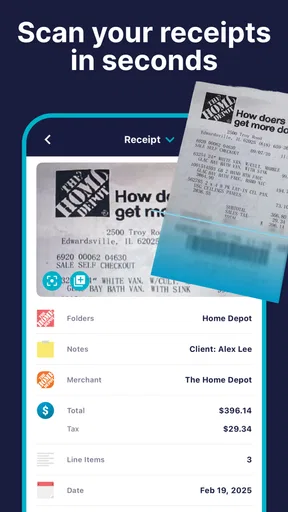
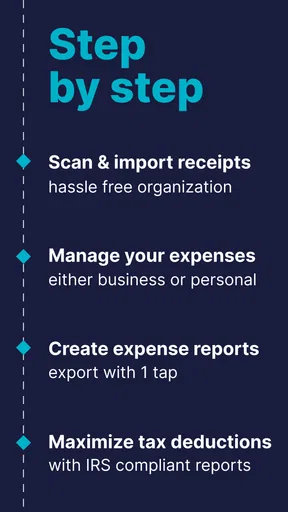
- Receipt Scanning: Got a pile of receipts? Just snap a photo, and the app does the rest. It automatically reads and categorizes them, which is a huge time-saver.
- Expense Tracking: Whether it’s groceries, dining out, or that spontaneous online shopping spree, SimplyWise keeps tabs on where your money goes.
- Budget Planning: This feature lets you set a budget and monitor your spending against it. A must-have for anyone trying to save a little extra at the end of the month.
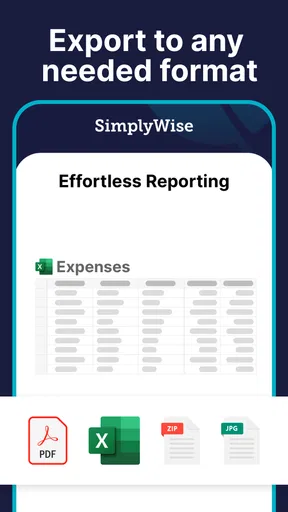
- Data Export: Need to share your expenses with an accountant or partner? You can easily export your data in a spreadsheet format.
Living with SimplyWise
After using SimplyWise for a couple of weeks, I found myself actually enjoying the process of organizing my expenses. The receipt scanning is particularly impressive and shockingly accurate. I was skeptical at first, but it managed to capture even the tiniest details from crumpled receipts.
One feature I haven't mentioned yet is the app's ability to remind you about upcoming bills. This is a game-changer if you're like me and tend to forget due dates. It’s like having a personal assistant looking out for your wallet.
Is It All Sunshine and Rainbows?
Of course, no app is perfect. While I love most of what SimplyWise has to offer, there are a few things to keep in mind. Occasionally, the app might misread a receipt, especially if it's particularly faded or crumpled. It’s a rare occurrence, but it happens.
Also, while the basic features are free, some of the more advanced options come with a premium subscription. It’s worth considering if you need those extras, but for most, the free version will suffice.
What I would check before relying on it
A scanner is only as useful as the records you can retrieve, so I would test the whole routine with a few ordinary purchases before making it the center of my bookkeeping. Scan a receipt, look over the recognized details, and try the spreadsheet export with a small set of expenses. That helps you see whether the result suits the way you or your accountant prefer to review transactions.
For receipts that include several items, take a moment to check the total and any details that matter to your records. A clear photo improves the odds of a clean capture; placing the paper on a flat, well-lit surface is a simple habit that can prevent avoidable corrections. Keep the paper until you are satisfied that the digital record is readable, especially for a purchase you may need to document later.
Everyday uses beyond tax season
Receipt capture is most valuable when it supports a decision you make regularly, not just when filing taxes. I would use the records to spot recurring work costs, check whether a planned purchase fits the month’s spending, or prepare a concise set of expenses before speaking with an accountant. The app’s tracking and budget tools can make those records more useful than a collection of disconnected images.
Imagine a self-employed photographer who buys a memory card, picks up lunch during a client job, and later pays for a household grocery run on the same busy day. The receipts can help distinguish those purchases when the day is still fresh. The important step is reviewing them promptly and marking the purpose accurately; scanning alone does not know which costs relate to work.
There is also a useful trade-off in keeping a routine deliberately simple. If you scan every slip but never review categories, you may end up with a neat archive that is still difficult to use. A short weekly check is likely more valuable than trying to perfect every entry at the moment of purchase. I would reserve extra attention for unusual or mixed-purpose expenses and let straightforward purchases take less time.
Price, platform, and expectations
SimplyWise is free to install, and its finance focus is reflected in a 4.7 average from around 9,700 ratings, with more than 100,000 installs. The app is from SimplyWise, is rated for Everyone, and its current version is 0.82.2. In-app purchases range from $0.99 to $449.99 per item, so I would check what an optional purchase covers before committing rather than assuming every tool is included at no cost.
It was released on December 4, 2020, and the stated minimum operating system is 7.1. That makes device compatibility worth checking if you use an older phone. More importantly, I would decide based on the task you need it to handle: if receipt organization is the pain point, the free starting point may be enough to judge whether its workflow suits you. If you need a full accounting setup or strict control over every bookkeeping rule, a dedicated accounting product may be a better fit.
Small habits that make the records more useful
One practical tip is to scan receipts in batches only when they are still easy to read and identify. If a receipt is faded by the time you get to it, the app has less to work with, and you may have forgotten the purchase context. For occasional paper slips, I would keep them in one temporary place and clear that spot during a weekly review rather than scattering them among bags, drawers, and the car.
Another helpful boundary is to decide how you will handle mixed personal and business purchases before the first busy week. The app can make recording faster, but your own consistent labeling is what makes later review meaningful. If you share expenses with a partner or accountant, the spreadsheet export can help pass along a record, but agree on category names and review habits so the same purchase is not interpreted differently by each person.
People often wonder whether scanning removes the need to keep paper. I would not treat it as an automatic reason to discard originals: first make sure the image is clear and that your record-keeping requirements allow the digital copy to serve your purpose. Another common question is whether it will correctly classify every purchase. It can reduce repetitive entry, but any automatically read or categorized detail deserves a quick check when accuracy matters.
Where I draw the line
SimplyWise is not the right answer for every kind of money management. If you mainly need to reconcile accounts, manage invoices, or run a more complete business ledger, a receipt-centered tool may leave important work elsewhere. Likewise, people who prefer to make every entry by hand may find a spreadsheet more transparent, while those who never keep receipts may get little value from a scanner.
The app’s strongest promise is convenience, and convenience works best when paired with a little discipline. I would not use an automatically captured record as proof that an expense is correct, tax-deductible, or categorized properly. Think of it as a way to preserve useful evidence and reduce typing, then apply your own judgment when reviewing the books.
The Verdict
All in all, SimplyWise: Receipts, Expenses is a fantastic tool for anyone looking to tame their financial chaos. It's user-friendly, efficient, and packed with features that genuinely make life easier. If you're drowning in receipts or just want a better handle on your spending, give it a try. You might just find yourself wondering how you ever managed without it!
And remember, staying organized doesn’t have to be a chore. With an app like SimplyWise, it can be as easy as snapping a picture. Happy budgeting!
My recommendation in practice
I would recommend trying it if paper receipts are currently the weak link in your bookkeeping. Start with a few work purchases, confirm that the captured details are useful, and see whether a regular review feels sustainable. If you can keep that habit, the app can make expense records easier to assemble without turning every purchase into a long admin task.
If your main goal is comprehensive business accounting, or you already have a tool that captures and organizes receipts as part of a larger workflow, I would compare those needs before adding another app. For someone who wants a lightweight bridge between a paper receipt and a usable expense record, though, SimplyWise offers a sensible place to begin. My advice is to use the scanner as a helper, verify the entries that matter, and choose the workflow that you will actually keep up.
Verdict
Strengths of SimplyWise: Receipts, Expenses
- Easy-to-use interface simplifies tracking expenses.
- Secure storage ensures protection of personal data.
- Real-time syncing across multiple devices.
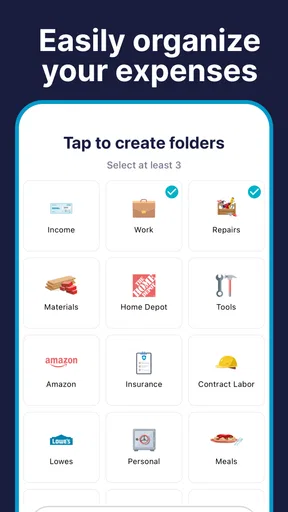
- Customizable categories for personalized organization.
- Efficient receipt scanning with high accuracy.
Limitations of SimplyWise: Receipts, Expenses
- Limited features in the free version.
- Occasional syncing delays reported by users.
- Requires internet connection for full functionality.
- Some users find subscription pricing high.
- In-app ads can be distracting.
Other Releases by SimplyWise
View All
SimplyWise Cost Estimator
Business4.8
Similar Picks in This Category
View All
Google Wallet
Google LLC4.3

Airtel: Recharge, Bank & Loans
Airtel4.0

PayPal - Pay, Send, Save
PayPal Mobile4.2

DANA Indonesia Digital Wallet
PT Espay Debit Indonesia Koe4.5

Binance: Buy Bitcoin & Crypto
Binance Inc.4.8

Cash App
Block, Inc.4.7
Frequently Asked Questions
What is SimplyWise: Receipts, Expenses, and how does it work?
SimplyWise: Receipts, Expenses is a financial management app designed to help users track and organize their receipts and expenses efficiently. By allowing users to scan and digitize paper receipts, the app categorizes and stores them in a secure cloud. With features like automatic expense tracking and reporting, it simplifies budget management and helps users stay on top of their finances.
Is SimplyWise: Receipts, Expenses free to use, or are there any premium features?
SimplyWise offers a free version with essential features like receipt scanning and basic expense tracking. However, it also includes premium features such as advanced reporting, data export options, and higher cloud storage limits. These premium features are available through a subscription plan, which provides enhanced functionality for users who need more comprehensive financial management tools.
How secure is my data with SimplyWise: Receipts, Expenses?
SimplyWise prioritizes user data security by implementing strong encryption protocols to protect information. All scanned receipts and financial data are stored securely in the cloud, ensuring that sensitive information is safeguarded against unauthorized access. Additionally, the app regularly updates its security measures to comply with industry standards, providing users with peace of mind regarding their financial data.
Can I integrate SimplyWise with other financial tools or apps?
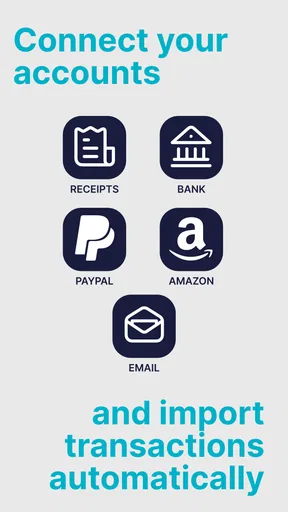
Yes, SimplyWise offers integration capabilities with various financial tools and apps. Users can sync their data with popular platforms like QuickBooks, Google Sheets, and other accounting software. This integration facilitates seamless data transfer and ensures that users can manage their finances holistically, making it easier to keep their accounts up-to-date and organized.
Does SimplyWise support multiple currencies and international users?
SimplyWise is designed with international users in mind, offering support for multiple currencies. This feature allows users from different countries to track expenses in their local currency, making it an ideal tool for travelers and global professionals. The app automatically converts and categorizes expenses based on the selected currency, enhancing its usability across diverse user bases.
